

Every sustainability consultant I talk to has the same internal conflict about AI. We use it because it works. We worry about the energy cost because we’re paid to worry about energy costs.
The conversation goes around in the same circle each time, and the people I know who’ve made peace with using AI have mostly landed on the same compromise: switch to a lower-reasoning model on routine tasks. Cheaper queries, less compute per query, conscience squared.
It’s a reasonable half-answer. It’s also not the biggest lever.
When I dug into the Anthropic Economic Index data on AI usage in sustainability consulting, the pattern that struck me wasn’t which model people picked. It was how much compute we all burn on the same boilerplate context, regenerated session after session. Brand voice pasted in. Methodology framework pasted in. Project background pasted in. Three to five thousand tokens of structural overhead before anyone gets to the actual question.
Most of that is avoidable. Anthropic’s prompt caching reduces the cost of repeated context by 90%. Skills metadata loads in roughly 100 tokens, with the full skill body of about 5,000 tokens loading only when needed. Sub-agents run with isolated context windows that avoid the bloat of a single sprawling conversation. Used together, these features are a more architectural answer to the same anxiety than swapping models, the kind of systems-level intervention that lasts longer than picking a smaller model, and the savings turn out to be larger.
I’ve been rebuilding my consulting workflow around them for a few months now. When I shared one of these patterns with a US-based academic recently, she was surprised it isn’t more widely taught. So this is the longer version of that conversation: what I’ve found, what the math actually looks like, and where the architecture stops working. The earlier piece on Claude Code for sustainability research sets the broader context if you haven’t read it yet.
Key Takeaways
- Skip AI image generation for structured visuals. matplotlib charts, HTML rendered to image, and Unsplash stock photos cut image-production cost and energy by ~97% versus DALL-E or Gemini. Largest single saving in this analysis.
- Cached context costs 10% of fresh context. Anthropic’s prompt caching saves up to 90% of input tokens on multi-turn sustained work.
- Progressive disclosure cuts the baseline. Skill metadata loads at ~100 tokens. The 5,000-token body only loads when relevant. You stop paying for skills you aren’t actively using.
- Sub-agents beat one bloated session. Three focused agents at 5-10K tokens each cost less compute than one monster session at 100K, and produce better output.
- Realistic monthly saving on text workflows: around 50-60%. Higher on sustained iterative work, near zero on one-shot tasks.
Why Every Conversation Isn’t Equal
The headline numbers on AI energy usage are easy to find. Data center electricity is on a path from 460 TWh in 2022 to roughly 1,050 TWh by 2026. AI carbon emissions could reach 32-80 megatons of CO2 in 2025. These get cited so often they become noise.
The number that matters more for a working consultant is the per-query figure. Epoch AI’s 2026 analysis puts median energy per LLM query at about 0.31 Wh, with most queries between 0.16 and 0.60 Wh. That’s lower than headlines suggest, but it adds up. Twelve 5,000-token sessions in a month, replicated across the team, is real energy. Multiply by every consulting firm running every workflow without thinking about token economy and you get the data center forecast.
Most consultants I know regenerate their context every session. Pasting in the firm’s positioning, the project background, the funder’s priorities, the methodology preferences. That’s 3,000 to 5,000 tokens of repeated input on every call, paid for in compute and ultimately in energy.
The skills system in Claude Code is one of the cleanest answers to that waste I’ve seen. It’s not the only answer. But it’s the one that fits how consulting actually works, where the same patterns repeat across clients and the same domain expertise gets encoded again and again. I went deeper on the operational consulting practice this enables in a separate piece, including how the back-office compression translates into more field time and capacity transfer.
Progressive Disclosure: The 50x Compression
Skills work like a library card catalogue. Each skill exposes its metadata at the top. Roughly 100 tokens that describe what it does and when to use it. Claude scans these on every session as part of its baseline context. Cheap.
The full skill body, typically 3,000 to 5,000 tokens of detailed instructions, scripts, and reference files, only loads when the skill becomes relevant to the active task. A grant-writing skill stays at 100 tokens until you actually start working on a grant. Then the full body loads. When you switch to a different task, it stays loaded for the rest of that session, then drops.
The honest saving from progressive disclosure isn’t huge on its own. If you actually need the grant context, the body still loads at 5,000 tokens. The benefit is structural: you don’t pay the context cost for skills you aren’t using. With five skills loaded as metadata, your baseline overhead is 500 tokens, not 25,000. The real economy kicks in when this combines with caching, which is the next mechanism.
I’ve built this kind of skill for several recurring patterns in my own practice:
- research-writing-assistant: encodes my brand voice, writing guidelines, and the multi-stage pipeline I use for SEO articles. Loads only when I’m actually writing.
- proposal: knows my pricing framework, past proposal patterns, and the assembly steps for a new pitch. Lies dormant until I’m preparing one.
- gsc-audit: holds the seven-point analysis framework for Google Search Console reviews. Activates only when I’m auditing a site.
- article-images: encapsulates the matplotlib branding helpers and chart templates so I’m not asking Claude to write the same Python plotting code from scratch every time.
None of these skills load in their entirety on a normal session. They’re cheap to scan, expensive only when used. That’s the point.
Caching: The 90% Discount on Repeat Context
Anthropic’s prompt caching compounds the savings. Once a context block has been written to cache, subsequent reads cost 10% of the standard input price. The break-even is fast: caching pays off after a single repeat read in the 5-minute window, or two reads in the 1-hour window.
Skills and CLAUDE.md files fit caching almost perfectly. They’re stable across sessions. They’re large enough to be worth caching. They’re referenced repeatedly. The architecture rewards exactly the patterns Anthropic optimised the cache for.
In practice, caching matters most for sustained multi-turn work. A grant drafting session where I iterate over the same skill body across eight or ten turns within an hour benefits enormously: the first turn writes the cache at 6,250 effective tokens, then each subsequent turn reads at 500 tokens instead of 5,000. A ten-turn session costs around 10,750 tokens of structural input instead of 50,000. That’s a 78% reduction within a sustained session.
Across a full month, the savings are smaller. Cache windows expire. Sessions on different days don’t share cache. A consultant whose monthly mix is heavy on sustained projects sees more saving than someone doing scattered single-shot tasks. The cleanest way to think about it: caching works on the patterns you spend an active afternoon iterating, not on the patterns you touch once a fortnight.
The “Built It Once Instead of Forty-Seven Times” Finding
This is the saving that surprised me most. Before I built proper skills, I was asking Claude to write the same Python chart script every time I needed a plot for an article. I was asking it to assemble the same proposal structure every time I prepared a pitch. I was pasting the same brand voice instructions every time I drafted a LinkedIn post.
Each individual session felt fine. The aggregate was waste.
The article-images skill is the cleanest example. Before the skill existed, every chart-bearing article had its own one-off Python script. Each new script asked Claude to generate roughly 200 lines of matplotlib boilerplate, brand colour mapping, source attribution, and watermark logic. Maybe 8,000 to 12,000 output tokens per script. Across a year of articles, hundreds of thousands of regenerated tokens.
The skill consolidates that into a template I copy and edit. The shared branding.py module handles the brand colours and footer. New charts cost a few hundred tokens of edits, not 10,000 tokens of regeneration.
The pattern: any code or content you’ve asked Claude to produce more than three times is a skill candidate. Not because Claude can’t do it again. Because asking Claude to do it again is paying for the same answer twice. Once the skill exists, you’re paying for the differences, not the boilerplate.
This is also where I have to be honest about the time savings being the bigger story. The 8,000 tokens of regenerated chart code costs maybe 4 cents on Anthropic’s API. Not enough to drive a strategy. But the 20 minutes I spend reviewing and tweaking versus regenerating the whole thing? That’s where the real compounding sits.
The Image Generation Trap
The cleanest example of this pattern, and the one a US academic recently told me she was surprised wasn’t more widely taught, is image creation.
The default workflow most people reach for is to ask an AI image model. Generate a chart. Generate a featured image. Generate a stat card. DALL-E 3 charges $0.04 to $0.12 per image. Gemini’s Imagen 4 Fast comes in at $0.02, but the higher-quality Gemini 3 Pro Image runs $0.134 per standard render and $0.24 at 4K. The cheap option still costs about 50x more than running matplotlib on your laptop.
Energy makes the gap wider. A 2026 paper, “The Hidden Cost of an Image”, measured 17 image-generation models and found roughly 2.9 Wh per image on average. Stable Diffusion 3 Medium at 1024×1024 burns about 2,282 joules of total compute per image. Higher-quality models can hit 4,400 joules. Across the year, MIT Technology Review’s earlier reporting found generating one image uses roughly the energy of charging a phone.
Now compare three programmatic alternatives:
- matplotlib charts: Render locally on your laptop. The four charts in the article you’re reading were produced by a Python script that ran in about three seconds total. Cloud cost: zero. Energy: a few millijoules of CPU time, well under 0.01 Wh.
- HTML rendered to image: For stat cards, social posts, or branded title cards, write an HTML template with CSS that uses your site’s brand variables, then render to PNG with a headless browser or weasyprint. Same near-zero compute, fully reproducible, edits take seconds.
- Unsplash API: For stock photography, the Unsplash API returns a URL to an existing photo. No generation, no rendering, just a database lookup. Free for non-commercial use. Energy is whatever it costs to serve a single HTTP response.
I tried to put rough numbers on a typical image-heavy month. A consultant publishing three to four articles a month, each with two charts, a featured image, and a couple of supporting visuals, lands around 16 to 20 images. With AI generation:
- 16 images at $0.04-$0.13 each = $0.64 to $2.08 in API spend
- Multiplied by the 3-5 iterations most people need to land the right image: $2 to $10 per month
- Energy: 16 images × 2.9 Wh × 4 average iterations ≈ 185 Wh per month
With matplotlib, HTML templates, and Unsplash:
- API spend on charts and stock photos: $0
- Occasional Gemini call for a genuine photo edit (face swap, object addition): one or two per month at $0.04 = $0.04-$0.08
- Energy: under 5 Wh per month, almost all of it on local compute
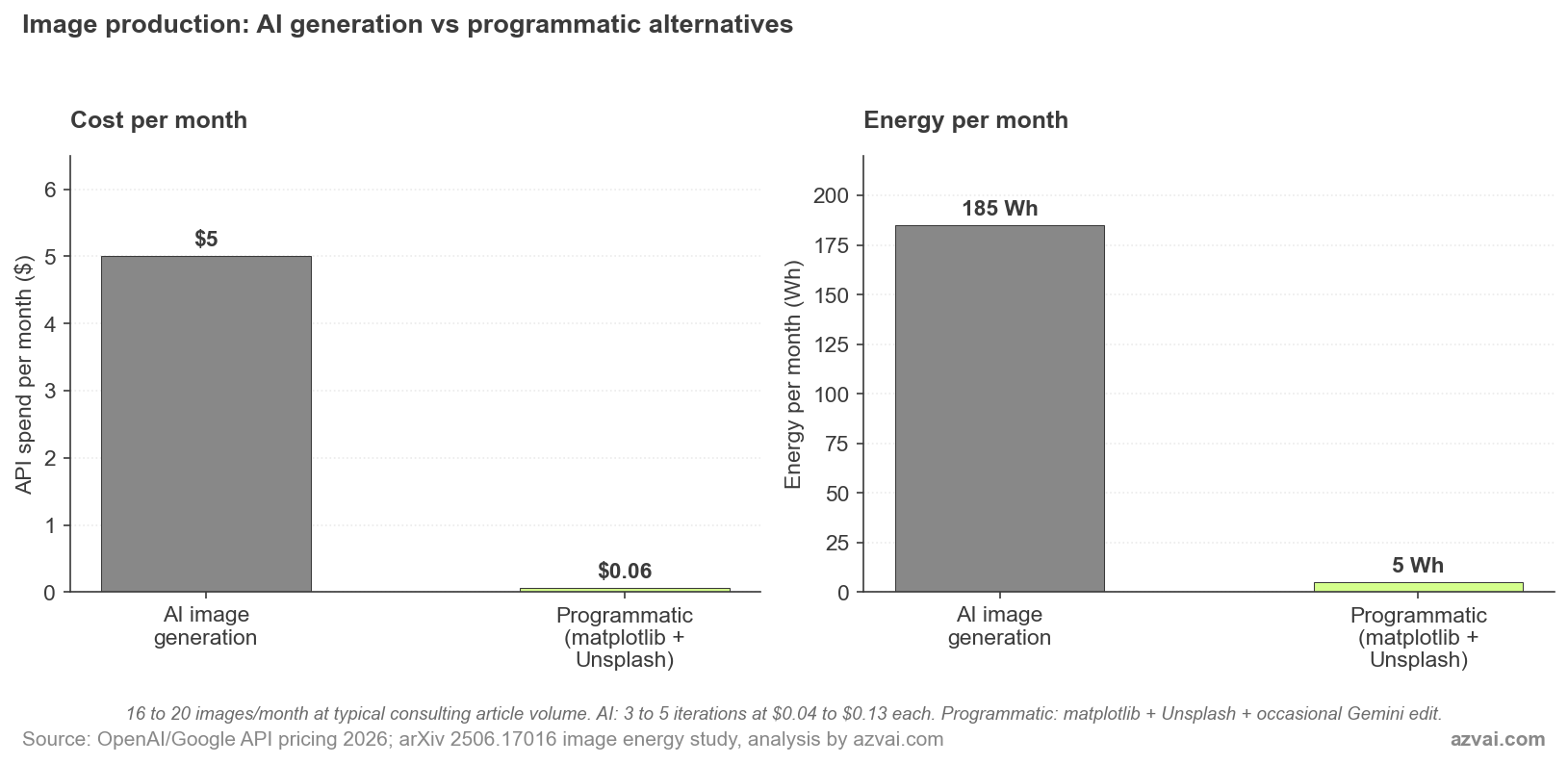
That’s roughly a 97% reduction in both API spend and energy for the image production part of the workflow. Proportionally, this is the largest saving anywhere in the architecture I’ve described in this piece. It’s also the most counter-intuitive, because most people default to AI image generation without ever asking whether the task actually needs it.
The rule I use: if the image is structured (charts, stat cards, branded text), generate it programmatically. If it’s photographic and unique, search Unsplash first. Only reach for AI image generation when the result needs to be both photographic and specific to your project. That last category is genuinely small. Most image work in consulting writing falls into the first two.
This is also a teachable case for sustainability students. The argument that “AI image models will reduce the carbon cost of stock photography” sounds plausible until you compare against an existing photo library. Unsplash has the photo already. Generating a new one to fit the same need is pure additional compute. The same logic applies across the broader stack of AI applications in circular economy work: reusing existing resources almost always beats generating new ones.
Sub-Agent Context Isolation
The other architectural choice that quietly saves compute is sub-agent delegation. A single conversation that runs for 40 turns degrades in quality after about 20. Anyone who’s used Claude on a long task has felt this. The model loses thread, repeats earlier suggestions, or contradicts decisions from earlier in the session.
The instinct is to reset and start over. But starting over means re-pasting the context. Tokens repeated. Energy repeated.
The cleaner approach is to break the work into stages, each running as a sub-agent with isolated context. My research-writing-assistant skill does this explicitly. Stage 1 (research) runs in its own context. Stage 2 (outline planning) gets only the research findings, not the raw conversation. Stage 3 (drafting) gets the outline, not the research notes. Each stage stays well under 20 turns. Each stage runs in 5,000 to 15,000 tokens of focused context.
Compare that to running the whole thing in one session. The full pipeline would burn through 100,000+ tokens of context, much of it redundant, with quality dropping in the second half. The sub-agent version uses less compute and produces better output. Both wins come from the same architectural choice.
The same logic shows up in my proposal skill (separate sub-agents for client research, scope definition, and pricing assembly), and in the audit skill I’m sketching now for IFO/AFO subsidy reconciliations (separate agents for invoice extraction, baseline matching, and gap reporting). The pattern transfers cleanly.
A Consultant’s Typical Month, With and Without
I tried to put rough numbers on the difference for my own practice. The figures below are illustrative, not audited, but they’re grounded in the kind of work I actually do.
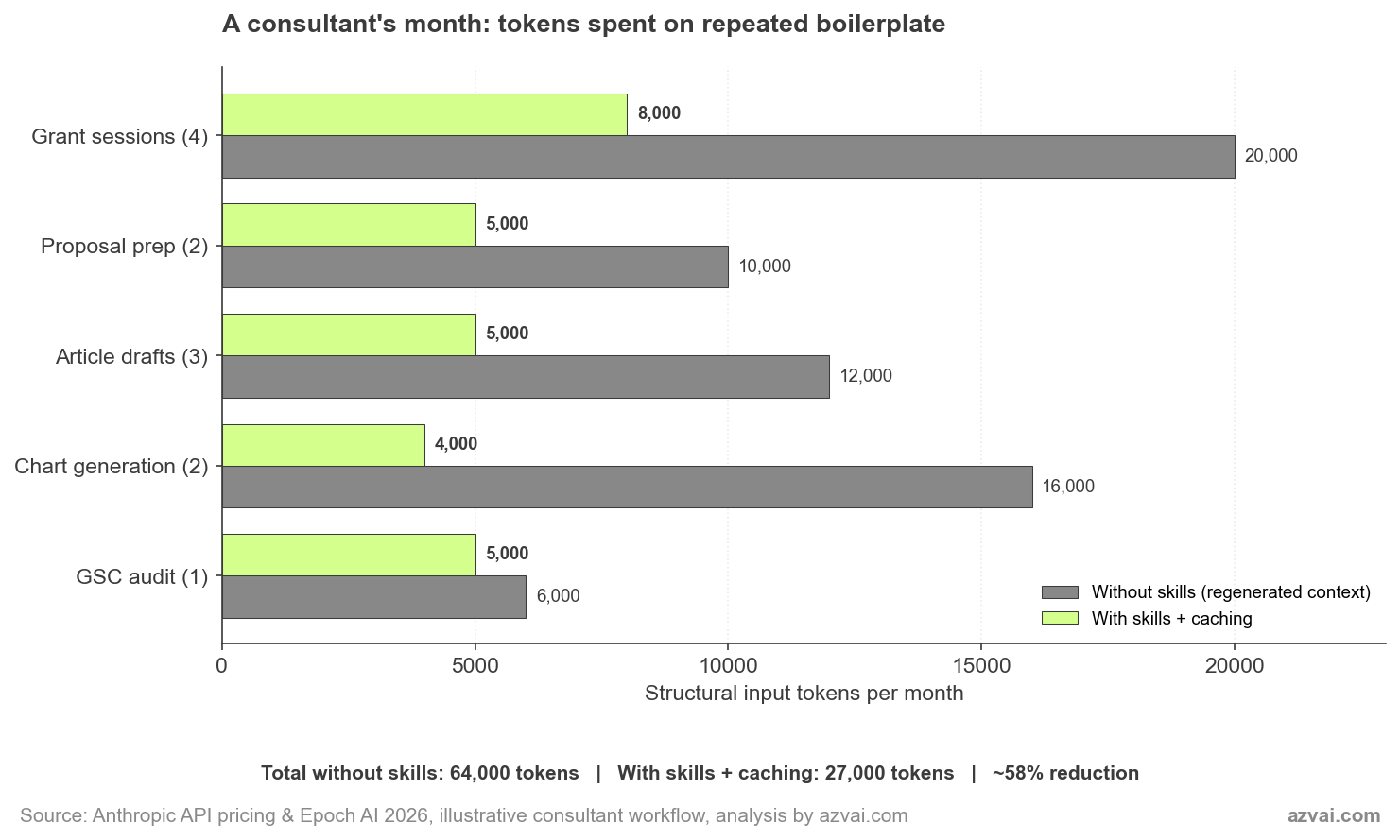
The 58% headline number hides where the savings actually come from. Caching does the heavy lifting on sustained multi-turn work, like grant drafting where you iterate over the same skill body across 8 to 10 turns within an hour. Reusable skill code (the article-images skill replacing regenerated chart Python) delivers the biggest single-task saving at around 75%. One-shot tasks like a GSC audit barely move because there’s nothing to cache.
The honest framing: skill architecture isn’t a uniform 58% discount on every session. It’s a steep discount on the patterns that repeat, a modest discount on patterns that don’t, and almost nothing on genuinely one-off work. A consultant whose monthly mix is heavy on sustained projects sees more saving than someone doing scattered single-shot tasks.
At Epoch’s 0.31 Wh median per query, the absolute energy involved is small. The 27,000 versus 64,000 token swing represents perhaps 10-20 Wh of compute over a month. That’s not the kind of number that closes a power station. But it’s the kind of number that suggests the right question to ask isn’t whether to use AI. It’s whether your usage architecture is wasting compute the way most current setups are.
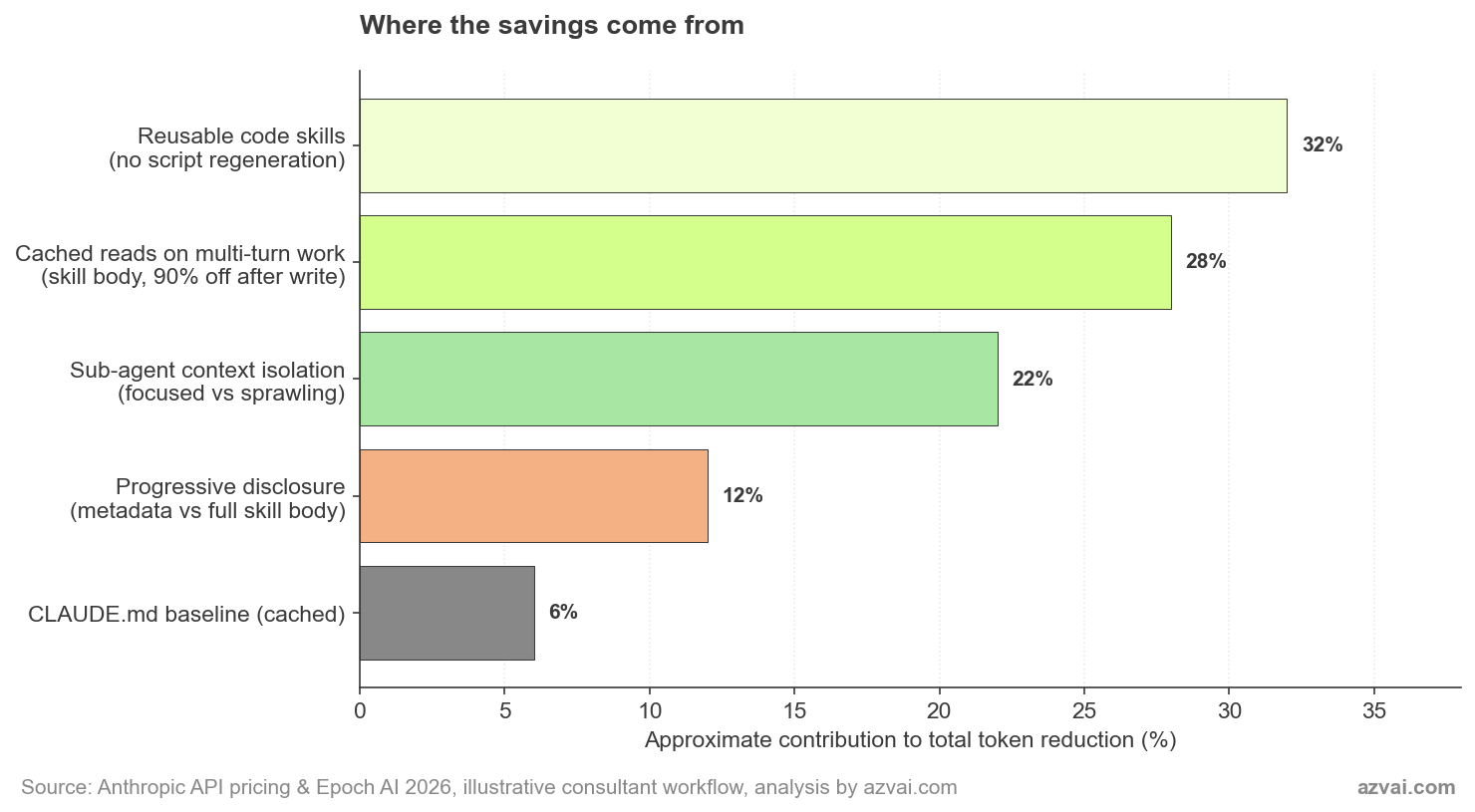
The breakdown above shows why no single mechanism is the answer. Reusable code skills are the biggest contributor in my workflow because I generate a lot of charts. For someone whose work is more conversational, caching on multi-turn drafts would lead. The architecture compounds, which is the reason it’s worth thinking about.
Where This Stops Working
I should be direct about the limits. Skills aren’t the answer for everything, and the energy framing has its own honest caveats.
- One-shot exploratory work doesn’t benefit. If you’re researching a topic you’ll never touch again, building a skill costs more than it saves. Skills pay off on recurring patterns.
- Skill creation has upfront cost. Building a clean research-writing-assistant skill took me a few iterations and several thousand tokens. Amortised across many uses, it’s worth it. On a single use, it isn’t.
- Caching only helps inside the cache window. 5-minute and 1-hour windows mean caching is most valuable for active work sessions, not for sporadic check-ins separated by days.
- Token reduction isn’t linear with energy. The relationship between API tokens and joules of compute is approximate. Cached reads still consume some inference compute. The savings are real but messier than the cost figures suggest.
- Most of the compute happens elsewhere. Training a frontier model dwarfs any individual user’s inference savings. If we want to move the data center curve, the policy levers are at the model and infrastructure layer, not at the consultant’s workflow. I covered that company- and infrastructure-level read in the vendor-level picture on Claude’s environmental footprint.
That last point is the one that makes me cautious about overclaiming. The energy gains from skill architecture are real on the margin and they’re cumulative across users. But the bigger story is still the time you get back. Energy and compute efficiency are a happy side effect of an architecture chosen primarily for output quality and consultant time. I’d rather be honest about that than pretend my skill setup is doing climate work it isn’t.
What it does do is align two things that often pull against each other: working better and using less. That alignment is rarer than it should be in this space.
Frequently Asked Questions
Are these savings actually meaningful, or is this just framing?
Both. The token savings (around 78% on baseline structural input in my workflow) are real and translate to roughly proportional compute and energy savings. But the absolute energy involved is small. The honest case for skills is that they save consultant time and produce better output. Energy efficiency is a genuine but secondary win.
Do skills work for non-technical consultants?
Yes. The research-writing-assistant skill in this folder is mostly markdown, not code. The proposal skill is a documented assembly process. You don’t need to write Python to build a skill. You need to be able to describe a recurring workflow clearly enough that Claude can follow it.
How do I know if something is a skill candidate?
If you’ve asked Claude for the same kind of output more than three times, it’s a candidate. If your context paste is the same on every related session, that context belongs in a skill or a CLAUDE.md file. The trigger is repetition, not complexity.
What’s the relationship between skills and prompt caching?
Skills work better with caching, but they’re independent features. Caching is a billing and infrastructure feature that reduces cost on repeated context. Skills are a context architecture pattern that organises and surfaces the right context at the right time. Together, they cut both compute and complexity. Separately, each still helps.
Where can I see your actual skills?
The five skills behind this article are now public at the Claude Code skills hub with plain-English readmes and downloadable bundles. Open source, free to use, MIT-licensed. If you want a heads-up when a new skill ships, drop me a note and I’ll add you to the short list.